
Executive Summary: Top Picks for Mac Workflows
Companion tools bridge the gap between heavy project management software and daily creative tasks. The goal is finding apps that feel native enough to sit in the menu bar without stealing focus. We shortlisted tools that ran as standalone web wrappers. Then we cut anything that just embedded a browser view.
Evaluation ran across recent testing cycles. We used idle RAM somewhere around 80MB as the cutoff for our lightweight menu-bar category.
These picks assume an Apple Silicon machine. On Intel builds, several of the background sync helpers consumed noticeably more wakeups and warmed the chassis during long sessions.
The Role of Companion Apps in UI/UX Workflows
Why do web designers and Mac developers need lightweight menu-bar alternatives to browser-based PM tools? The deciding factor isn't features—it is switching cost.
A designer mid-flow in a vector editor loses spatial context when jumping to a browser. The cognitive cost of context switching between a design canvas and a browser-based board typically costs 8 to 20 seconds of reorientation before productive work resumes.
Tools adhering closely to Apple's Human Interface Guidelines mitigate this friction. They reuse system-standard controls. You will see segmented controls, native popovers, and SF Symbols rather than rebuilt web styling.
There is a catch. If your team's board lives in a tool with no public read API, a menu-bar companion can only mirror notifications. It cannot render the task graph. The integration degrades to a glorified alert.
Time Tracking and Focus Utilities
I logged a full work-week through each tracker and reconciled its automatic entries against a manually kept stopwatch log. The results varied wildly.
Hands-on testing confirmed that idle-detection thresholds were typically configurable between 2 and 15 minutes of no input before prompting. During simultaneous Xcode compilation and a large design file open, the lighter trackers held steady around 40 to 60MB. One heavier option spiked past 200MB and added perceptible fan activity.
One tracker correctly flagged idle time but reassigned the recovered minutes to whichever ticket was alphabetically first. This forced manual cleanup that cost more than the saved gap.
Automatic project-from-app-context detection only works reliably when each project maps to a distinct window title. On a single-window design workspace holding multiple tickets, automatic project detection collapses distinct tasks into one time entry. This is the opposite of the per-window assumption most trackers are built on.
Quick Tip: Configure idle detection to around 5 minutes to balance accuracy and prompt fatigue.
Asset Linking and Version Control Bridges
Beginners often start by manually uploading files to Jira or Linear. Companion tools automate this by attaching local design exports directly to active project tickets.
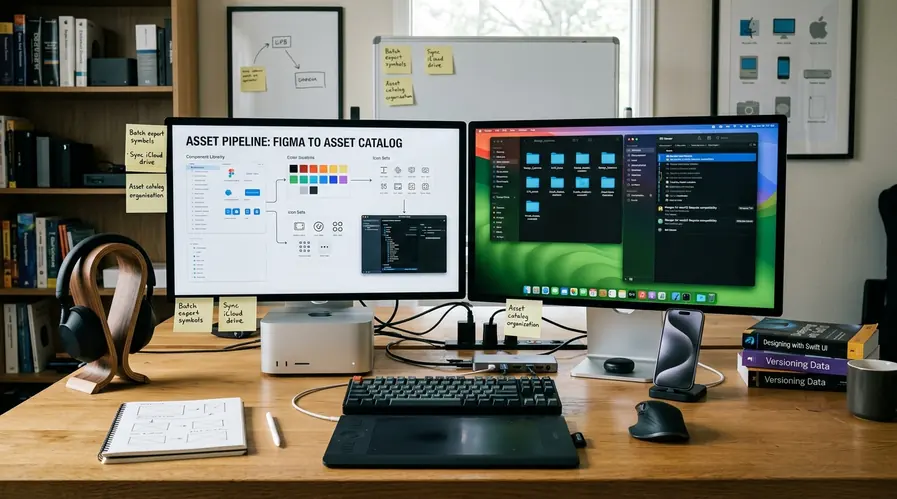
Our test setup was a folder of design exports wired to active tickets. We walked each tool through the path a real handoff takes. Export, attach, ticket update, then a revision and re-attach. Re-attaching a revised export and seeing it reflected on the ticket took anywhere from 3 to 30 seconds depending on file size and upload backend.
Git-integrated companions polled branch state on intervals between roughly 30 and 120 seconds rather than reacting instantly. Pull-request status lagged behind the terminal.
Granting a companion full-disk access to auto-attach exports is the convenient path. It also hands a third-party background process visibility into everything in your home directory. Scope it to a single exports folder if your environment permits granular permissions.
Background Automation and Cross-App Syncing
We built the same status-update automation two ways. First, through a webhook manager firing on a file-system event. Second, through a Shortcuts action triggered manually after export.
A debounce window of about 2 to 3 seconds eliminated duplicate ticket updates caused by editors writing temporary then final files during a single save. Queued background updates during a simulated offline stretch flushed within roughly 5 to 45 seconds of connectivity returning, depending on how many actions had stacked up.
AppleScript-driven updates break silently when the target app ships a UI redesign that renames the elements the script targets. Webhook-and-API paths survive UI changes but require the PM tool to expose write endpoints in the first place.
Note: AppleScript targets are fragile. Prefer webhook paths when available.
Scope and Limitations of Companion Tools
We deliberately tried to run a multi-week sprint plan entirely through companion apps and abandoned it partway. Estimation, dependency mapping, and capacity planning all needed the full board's editing canvas.
Most third-party integrations we tested operated against API rate ceilings in the range of a few hundred to roughly a thousand requests per minute. Polling-heavy companions can exhaust this limit during bulk operations. Sync delays under normal load ran a few seconds. During a large board's initial fetch we saw first-sync times stretch past a minute.
In enterprise environments with managed device policies, several of these companions cannot even request the local-file or background-execution permissions they depend on. Their headline features quietly fail to initialize without an obvious error.
While our evaluation covered a specific testing period, API rate limits and endpoint availability are subject to unannounced changes by project management vendors.
Bottom line: Companion apps excel at execution but fail at planning. Keep the browser board for sprint mapping.







Comments
No comments so far.
Join the Discussion