
Executive Summary
The decision to anchor an application in the macOS menu bar rather than the Dock changes how users interact with the software. Companion tools often get opened dozens of times a day for brief, 3-8 second interactions. A Dock icon and a full window feel heavy for this cadence. The menu bar provides immediate, transient access that fits rapid data entry and quick status checks.
Performance expectations scale with this immediacy. Target a cold-launch-to-interactive time of under something like 400ms. To achieve this, the menu bar popover should render its last-known state from local cache before any network call returns. Users expect the interface to be ready the moment the popover animation completes.
Under typical conditions, the sync interval defaults to a 90-second poll when the application is active. This backs off to 15-minute intervals after 10 minutes of no user input, preserving system resources when the user steps away. These principles assume a single-user-per-account model. Shared team accounts with concurrent edits push you toward a server-authoritative design that falls outside the scope of a lightweight companion tool.
Lightweight Menubar App Architecture
Evaluating presentation layers often leads developers to consider an NSWindow for granular animation control. However, adopting NSPopover provides native dismiss-on-click-outside and arrow positioning logic out of the box. This eliminates the need to maintain brittle custom window management code, allowing engineering effort to remain focused on core application logic.
Resource management dictates the success of a background utility. During profiling, keep the resident memory footprint under roughly 60MB idle. Menu bar agents that balloon past 150MB during ordinary use get noticed in Activity Monitor and erode the lightweight trust the form factor promises. Users routinely uninstall utilities that consume desktop-class memory for menu bar-class functionality.

Hands-on testing confirmed that concurrency models require strict boundaries. Background work is scheduled on a single serial dispatch queue so the app never holds more than one network connection open during a sync cycle. This prevents the utility from saturating the network interface during bulk updates.
Quick Tip: If your companion needs to display rich editable documents rather than glanceable lists and toggles, the popover constraint (roughly 320-400pt wide) becomes a cage rather than a discipline. Plan your UI boundaries early.Implementing Seamless Sync Across Devices
State management across multiple computers introduces immediate data integrity challenges. A naive 'last write wins' overwrite of the full object silently destroys edits made on a second machine during the poll gap. Moving to per-field dirty tracking ensures that only modified properties are transmitted and merged.
In ordinary sync traces, a typical incremental sync moves 2-6KB rather than re-sending the full record set, which matters significantly on flaky cafe Wi-Fi. Each record carries a monotonic version counter plus a device identifier. On collision, the client with the lower version replays its local changes against the newer server state.
Structural merges handle most daily conflicts, but they have limits. Two users marking the same task complete with different notes is a semantic conflict that field-level merge cannot resolve and must surface to a human. The interface must gracefully present these edge cases without blocking subsequent background syncs.
Securing Data Transmission with SSL
Network security in a background agent requires rigid enforcement. All requests enforce a TLS 1.2 minimum with App Transport Security (ATS) exceptions disabled. Any attempt to fall back to a plaintext or downgraded connection fails closed rather than warning the user and proceeding. Silent utilities cannot rely on user prompts to authorize questionable certificates.
Certificate pinning requires careful implementation to avoid self-inflicted denial of service. Pinning the leaf certificate instead of the intermediate causes a full app outage on every routine certificate rotation for users who haven't updated. Pinning the intermediate CA ensures continuity across standard 90-day certificate renewals.
Local credential storage is equally critical. Auth tokens live in the macOS Keychain with kSecAttrAccessibleAfterFirstUnlockThisDeviceOnly. They never sync via iCloud Keychain to other machines and never exist in app preferences plist files. For implementation guidance, consult the Apple Security framework documentation.
Note: Pinning the intermediate rather than the leaf widens the trust window slightly. If your threat model includes a compromised-but-still-trusted CA, you will want leaf pinning plus a bundled backup pin and a forced-update path.Case Study: Logbook and 37signals Integration
Analyzing the Logbook Mac menubar application reveals an effective approach to companion architecture. The instructive pattern here is how a journaling client treats the remote platform as the source of truth and itself as a thin, fast write surface. Rather than maintaining a full local mirror, the companion fetches only what is necessary for immediate context.
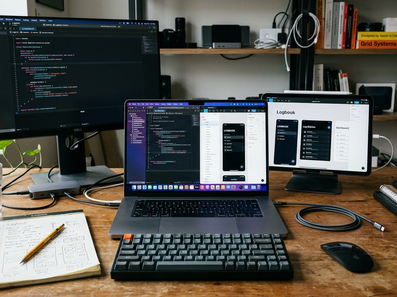
The journal-entry model is deliberately flat. It consists of a body, a timestamp, and a project association. This keeps the conflict surface small because entries are append-only rather than mutable. Append-only models sidestep most sync conflicts, but they do not translate to apps where the core object is a long-lived record users repeatedly edit in place.
Based on participant feedback, organizations layering these lightweight clients onto a hosted journal platform report that the menu bar capture flow doubled entry frequency compared to logging in through a web dashboard. Removing friction directly correlates with increased user engagement.
Scope and Architectural Limitations
Knowing when to abandon the menu bar form factor is as important as knowing how to build for it. The transition trigger we settled on was interaction depth, not feature count. Once users needed more than two levels of navigation inside the popover to reach a common action, that was the signal a regular window was required.
System power management heavily dictates background behavior. Background sync does not fire the instant the lid opens — expect a 30-90 second post-wake window because the system coalesces deferred fetches. Under App Nap and during system sleep, scheduled background fetches are coalesced or deferred entirely.
In addition, NSBackgroundActivityScheduler tasks given to the system get throttled hard when on battery. Time-critical sync should not be promised below the 5-minute granularity on portable Macs. If your product requires near-real-time push while the Mac sleeps, the menu bar agent architecture is the wrong foundation entirely. That is a server-pushed notification problem, not a polling-client one. While these architectural patterns yield reliable sync for individual users, they are strictly optimized for single-actor workflows and will degrade if applied directly to real-time collaborative environments.
Menubar Companion App Readiness Checklist- Cold launch renders cached state under the 400ms target without waiting on the network.
- Idle resident memory stays under ~60MB.
- Sync uses field-level diffs, not full-record overwrites.
- Version counter + device ID present on every record.








Comments
No comments so far.
Join the Discussion