

Why Hybrid Web-Wrapper Apps Demand Native System Authentication
Delegating login to a system-brokered browser session while anchoring credential persistence in the macOS Keychain provides an authentication architecture for hybrid desktop applications. When engineering teams evaluate handling the entire login flow inside a primary WKWebView against delegating to the operating system's native authentication broker, the native approach separates authentication from embedded web content. In modern mac development, treating the webview purely as an authenticated rendering target rather than a credential collector strengthens security and elevates ui/ux design.
For developers building a 37signals-style Mac companion application, the architecture rests on four foundational pillars:
- System-Brokered OAuth Capture: Utilizing
ASWebAuthenticationSessionto handle the initial OAuth handshake outside the application's primary web container. - Hardware-Backed Token Persistence: Employing
SecItemAPIs to store access and refresh payloads securely inside the macOS Data Protection Keychain. - Asynchronous Session Injection: Bridging native bearer tokens into web sessions via
WKHTTPCookieStoreprior to initial DOM navigation. - Silent Background Refresh: Intercepting expired states on app launch or wake cycles to rotate tokens without disrupting the visible workspace.
This separation of concerns guarantees that embedded web content never accesses raw credentials. Executing the login flow inside a system-brokered sheet immediately activates Safari AutoFill, native WebAuthn, Touch ID passkey prompts, and hardware security key bindings such as YubiKey over USB-C. Inside an isolated WKWebView, those same hardware integrations either fail outright or require complex custom entitlements. Separating the OAuth capture from the main webview also replaces custom authentication UI bridge scripting with a native controller implementation.
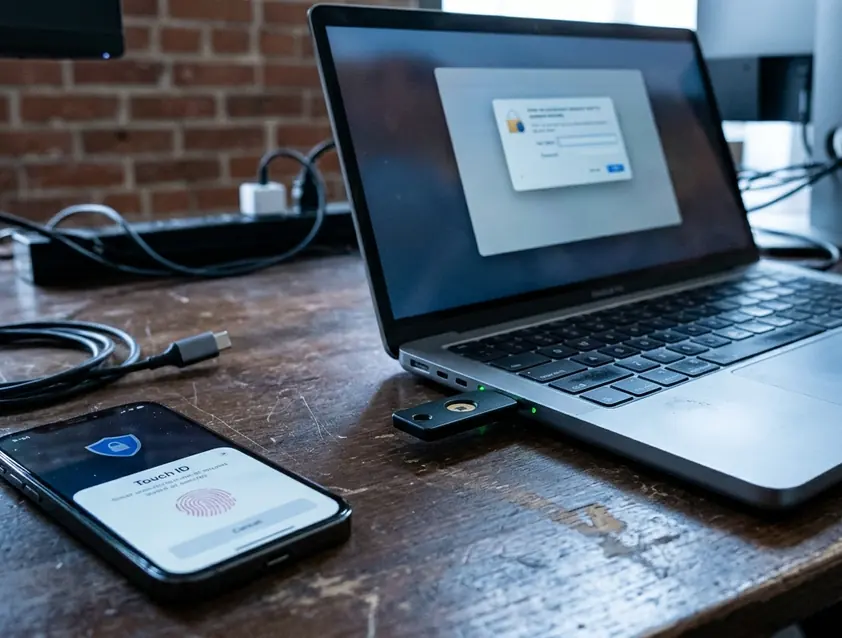
Capturing the OAuth Handshake via ASWebAuthenticationSession
How does a native macOS wrapper capture a web-based OAuth redirect without exposing the primary interface to unauthenticated routes? The solution begins by configuring an ASWebAuthenticationSession initialized with a custom URL scheme callback (such as myapp://auth/callback) and implementing ASWebAuthenticationPresentationContextProviding to anchor the modal authentication sheet directly to the active NSWindow. Detailed protocol requirements are outlined in Apple's ASWebAuthenticationSession documentation.
Before launching the session, the client prepares Proof Key for Code Exchange (PKCE) parameters. PKCE code verifiers are generated using 32 bytes of cryptographic randomness from SecRandomCopyBytes, base64url-encoded into a 43-character ASCII string alongside a SHA-256 code challenge. Once the user authenticates in the system sheet and the server redirects to the custom scheme, the native controller parses the incoming authorization code from the callback URL. A background URLSession dataTask then executes a POST request combining the authorization code and the original PKCE verifier to exchange them for an access token and refresh token pair. This network call enforces a strict 10-second timeoutIntervalForRequest to prevent hung sheets if the local network drops during the callback.
A consideration for multi-account desktop wrappers involves the configuration of prefersEphemeralWebBrowserSession. When designing a multi-workspace switcher, developers must weigh keeping this property permanently false to leverage active browser sessions against the friction caused when users need to sign into a secondary account. Dynamically toggling the ephemeral flag accommodates these separate sign-in flows. Setting the flag to false during initial onboarding speeds up workspace sign-in by sharing cookies with the user's default browser. When the user explicitly triggers an "Add Account" flow, switching prefersEphemeralWebBrowserSession to true forces a clean-slate prompt, preventing the system sheet from auto-completing the handshake with the already-authenticated primary workspace.
Persisting Access and Refresh Tokens in the macOS Keychain
Storing sensitive OAuth payloads in plain-text UserDefaults or unencrypted application support files exposes user workspaces to trivial local extraction. A production-grade companion app requires a clean Swift wrapper around SecItemAdd, SecItemCopyMatching, and SecItemUpdate configured with kSecClassGenericPassword.
To support simultaneous sign-ins across personal and client workspaces without key collisions, the storage layer must be structured around composite Keychain queries. Rather than serializing a single monolithic JSON blob into one entry, the wrapper maps the application's bundle identifier to kSecAttrService and assigns the unique workspace or user ID directly to kSecAttrAccount.
func saveToken(_ tokenData: Data, forAccount accountID: String) throws {
    let query: [String: Any] = [
        kSecClass as String: kSecClassGenericPassword,
        kSecAttrService as String: "com.example.companionapp",
        kSecAttrAccount as String: accountID,
        kSecUseDataProtectionKeychain as String: true,
        kSecAttrAccessible as String: kSecAttrAccessibleAfterFirstUnlock,
        kSecValueData as String: tokenData
    ]

    let status = SecItemAdd(query as CFDictionary, nil)
    if status == errSecDuplicateItem {
        let searchQuery: [String: Any] = [
            kSecClass as String: kSecClassGenericPassword,
            kSecAttrService as String: "com.example.companionapp",
            kSecAttrAccount as String: accountID,
            kSecUseDataProtectionKeychain as String: true
        ]
        let updateAttributes: [String: Any] = [
            kSecValueData as String: tokenData
        ]
        let updateStatus = SecItemUpdate(searchQuery as CFDictionary, updateAttributes as CFDictionary)
        guard updateStatus == errSecSuccess else { throw KeychainError.unhandledError(status: updateStatus) }
    } else if status != errSecSuccess {
        throw KeychainError.unhandledError(status: status)
    }
}
Notice how the query explicitly sets kSecUseDataProtectionKeychain to true and kSecAttrAccessible to kSecAttrAccessibleAfterFirstUnlock. This modern configuration eliminates the legacy macOS Keychain access control lists that otherwise trigger modal system password prompts after every app binary update, while allowing background notification extensions or launch agents to read tokens seamlessly. Handling token rotation requires checking the OSStatus return code of SecItemAdd for errSecDuplicateItem (-25299) and immediately branching to SecItemUpdate with a clean attribute dictionary that omits kSecClass.
Entitlement Boundary on Local Builds
While the Data Protection Keychain provides proven cross-process security when deployed via signed release channels, setting
kSecUseDataProtectionKeychaintotruewithout an embedded provisioning profile containing thekeychain-access-groupsentitlement immediately aborts token persistence withOSStatus-34018 (errSecMissingEntitlement) on local ad-hoc or unsigned debug builds.
Injecting Authenticated State into an Embedded WKWebView
Translating a native Keychain-stored bearer token into an authenticated web session inside an isolated WKWebView represents the core friction point in hybrid app architecture. We initially attempted to inject the session cookie by passing a custom Cookie header directly on the initial URLRequest passed to webView.load(), but dropped that approach after discovering that subsequent internal fetch() calls and top-level navigations inside the webview stripped the header and kicked users back to the web login screen.
Moving the injection into WKWebsiteDataStore.default().httpCookieStore solves session persistence across the entire lifecycle of the webview. Whether your backend exchanges a bearer token via a native bootstrap endpoint to yield a session cookie or allows constructing an HTTPCookie directly, the cookie attributes must be exact. Cookies constructed for hybrid dashboard wrappers must explicitly define HTTPCookiePropertyKey.domain with a leading period (such as .example.com) for subdomain matching, set .path to /, and include the .secure flag to pass strict server-side session validation.
func injectSessionCookie(_ cookie: HTTPCookie, into webView: WKWebView, targetURL: URL) {
    let cookieStore = webView.configuration.websiteDataStore.httpCookieStore
    cookieStore.setCookie(cookie) {
        DispatchQueue.main.async {
            let request = URLRequest(url: targetURL)
            webView.load(request)
        }
    }
}
Accounting for asynchronous process timing is mandatory here. The separate WKNetworking process needs time to synchronize an injected HTTPCookie from the main UI thread's WKHTTPCookieStore. Calling webView.load() outside the setCookie completion handler triggers a race condition where the detached WKNetworking process fires the initial GET request before inter-process cookie synchronization finishes, causing the server to issue a false 302 redirect to /login. Nesting the load call strictly inside the completion block guarantees the cookie is present in the network process prior to initial navigation.
Silent Token Refresh and Expired Session Recovery on Relaunch
Desktop usage patterns differ sharply from mobile habits. Short-lived access tokens and session cookies typically expire after 60 to 120 minutes, whereas MacBook lids frequently remain closed for 48 to 64 hours between Friday evening and Monday morning. When a user wakes their Mac from a weekend sleep cycle, the embedded webview's next click or background poll will inevitably hit the server with an expired session.
To prevent users from seeing a jarring flash of the web login screen, the WKNavigationDelegate must act as an active gatekeeper. The delegate intercepts the expired state inside webView(_:decidePolicyFor:decisionHandler:), returning .cancel promptly after detecting a 401 Unauthorized status code or a 302 redirect with a Location header pointing to /login. Canceling the navigation in flight holds the current DOM visually intact while the native layer orchestrates recovery.
Once navigation is paused, the native controller reads the workspace's refresh token from the Data Protection Keychain and executes a silent background token exchange. Upon receiving the rotated payload, the app updates the Keychain record via SecItemUpdate, constructs the replacement HTTPCookie, and injects it into the WKHTTPCookieStore. Inside the cookie store's completion handler, the webview replays the original intercepted URLRequest.
You open your MacBook lid on Monday morning, click the companion app icon in the Dock, and watch your project dashboard render its latest updates immediately as the refreshed cookie slides into the webview behind the scenes without a single sign-in prompt.








Comments
No comments so far.
Join the Discussion