

Why Full Feature Parity Sinks Native Mac Companion Apps
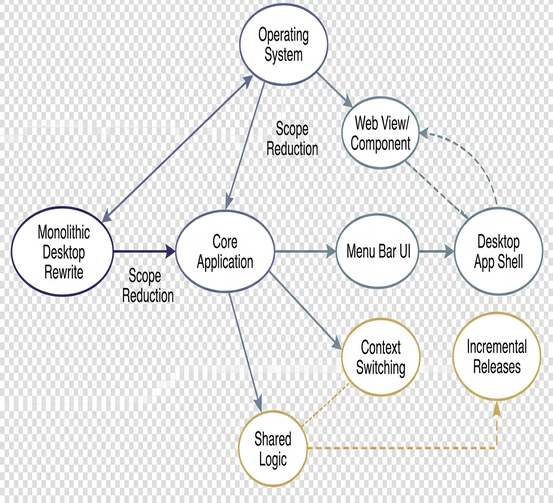
Software teams that misjudge desktop scope pay an immediate engineering penalty: months of stalled release cycles, duplicated business logic bugs splitting across WebKit and AppKit, and an abandoned Mac client that perpetually trails the web product. A Mac companion for a web-first application succeeds only when restricted to operating-system triggers—menu bar presence, global keyboard shortcuts, and native notifications—while deferring heavy workflow management to the browser.
Maintaining thin Mac wrappers and native utilities between late 2012 and 2014 across the OS X Mountain Lion and Mavericks releases forced a hard reckoning with this boundary. Every desktop wrapper project began with the same architectural question: what does the Mac operating system execute that an open browser tab cannot? Across multiple shipping cycles, the functional answer narrowed to three specific capabilities: a persistent menu bar icon, a system-wide hotkey, and Notification Center delivery. Observing how 37signals approached restrained desktop releases for its web suite fundamentally reshaped our internal roadmap.
The technical constraints of that period penalized bloated hybrid clients heavily. Mountain Lion (OS X 10.8, released in mid-2012) introduced NSUserNotification and Notification Center, marking the first time a third-party Mac companion could post native system alerts without bundling an external notification framework. However, embedded web content in that era still relied on the legacy WebKit WebView class. Because the faster, out-of-process WKWebView did not arrive on the Mac until OS X 10.10 in late 2014, rendering complex web UI inside a desktop wrapper remained noticeably slower and far harder to debug than loading the identical page in Safari.
Release velocity suffered even worse under parity expectations. In 2013, a routine web-product UI adjustment typically reached the Mac build 3 to 5 weeks after the initial web deploy. That lag absorbed Objective-C code changes, quality assurance sweeps across OS X 10.7 through 10.9, and Mac App Store review queues, which commonly ran 5 to 9 days at the time.
Menu Bar Presence Over Monolithic Desktop Rewrites
Deconstructing how 37signals approached desktop software for products like Campfire and Basecamp reveals a sharp architectural divide governed by where user attention sits. Group chat rooms require auditory or peripheral monitoring while an engineer writes code in another application, so the desktop layer handles ambient awareness: unread badges, sound cues, and a rapid paste target. Project management, by contrast, occurs in deliberate, focused sessions, keeping it firmly inside the browser.
Wait times and background resource management dictated the exact boundary between native Cocoa controls and web views. A resilient companion architecture isolates system hooks into a lightweight native shell:
- NSStatusItem integration: Anchors persistent menu bar presence and accepts direct drag-and-drop file uploads onto the status icon or the application Dock tile.
- Power management observers: Subscribes to NSWorkspaceWillSleepNotification and NSWorkspaceDidWakeNotification so the client cleanly drops and re-establishes its streaming socket rather than displaying stale unread counts after a laptop lid closes.
- Carbon hotkey registration: Routes global quick-entry shortcuts through the legacy Carbon RegisterEventHotKey API. Using the newer NSEvent global monitor forced users to grant system-wide accessibility permissions inside System Preferences, creating a disproportionate support burden for a minor capture feature.
- Long-lived socket management: Adapts to OS X Mavericks (10.9, October 2013), which introduced App Nap and aggressive timer coalescing. Backgrounded companions that polled servers on short intervals had their timers throttled by the kernel, pushing architecture toward a single persistent connection paired with server-driven notifications.
This thin-client split holds up exceptionally well for synchronous team communication and quick file capture, though it deliberately sacrifices full offline database replication; teams whose members regularly work without network connectivity for hours at a time require a local-first synchronization engine rather than an ambient wrapper.
The Maintenance Debt of Duplicating Web Views in Cocoa
Why do engineering teams continually fall into the trap of rebuilding web preferences inside AppKit? Users frequently ask for native settings panels in early feedback forms, convincing product managers that a "complete" Mac app requires local configuration screens.
Building a comprehensive Cocoa settings window to mirror web account preferences proved to be a costly mistake that had to be stripped out two release cycles later. Despite vocal user requests during beta testing, anonymous usage logging revealed that desktop sessions almost always began and ended at the menu bar popover or the unread badge count. The native settings window rarely opened after the initial application launch.
The Three-Codebase Synchronization Tax: A single renamed web preference routinely broke the custom JSON endpoint built exclusively for the desktop client and the Cocoa panel consuming it, forcing a one-day web tweak to wait behind 4 to 7 working days of coordinated engineering and a 5-to-9-day Mac App Store review.
Every preference the web team added or renamed triggered a three-tier maintenance cascade: updating the primary web UI, patching a bespoke JSON endpoint maintained solely for the desktop app, and recompiling the Objective-C view controller. Compounding that friction, the Mac App Store sandboxing mandate enforced from June 2012 meant that every new native capability added to a parity client—such as file system access outside the application container or AppleScript automation of other apps—required a dedicated security entitlement. Each added entitlement introduced a fresh App Store rejection risk that a focused web-view or companion approach avoided entirely.
Focused companions that execute one specific job, such as watching a Campfire room for direct mentions or accepting dropped Finder files, rely strictly on core API endpoints the web product already maintains. Those foundational endpoints survive major web UI redesigns without forcing an emergency Mac release.
Replacing Feature Backlogs With Hard Platform Boundaries
Defining a Mac build as a strictly scoped companion transforms internal interface design debates. Product roadmap meetings stop asking when the desktop team will port missing web features and start asking whether a capability belongs to the host operating system or the web application. A feature belongs to the OS only when it must react to hardware or session events: system login, sleep/wake cycles, a global keypress, or a binary file dragged directly from Finder. Everything else stays on the web.
For Mac developers and designers preparing a 1.0 companion release, enforcing this boundary requires cutting multi-step, shared-state interfaces before writing a line of Objective-C:
- Cut account and billing administration: Payment workflows and seat management change frequently and require zero offline or background OS integration.
- Cut deep archive and full-history search: Indexing and querying years of message history belongs on server infrastructure rendered through standard browser pagination.
- Cut multi-user permission editors: Access-control matrices involve complex validation logic that already exists in the web codebase.
- Cut project or room creation wizards: Provisioning workflows are infrequent administrative tasks rather than ambient daily actions.
What remains forms a tight, resilient 1.0 specification: one monochrome status icon, an unread badge count, a single popover action (jumping straight to an active room or uploading a dropped file), a configurable global hotkey, and Notification Center delivery. The Apple Human Interface Guidelines for menu bar extras reinforce how physical screen geometry dictates this discipline.
In OS X releases up through Mavericks, the system menu bar occupied a rigid 22-point vertical height, within which status item artwork had to be drawn as an 18-point-tall template image so the window server could cleanly invert the glyph on highlight. That 22-point strip serves as an uncompromising architectural filter: if a proposed Mac feature cannot be expressed through an 18-point monochrome glyph and a single popover action, it goes straight back to the web roadmap without an engineering estimate.








Comments
No comments so far.
Join the Discussion